Blog CS A Repository of Things

Building a Computer Vision rig with SimpleCV and IPython

A project of mine requires some image processing and OCR, which has led me into the interesting world of computer vision.

My initial research led me pretty quickly to OpenCV which is used by google among others for all things computer vision. However, this seemed a bit overkill for my use case, and with a steeper learning curve than I was willing to start with, so I decided to start from scratch first to build my knowledge.

After playing around in R and using tools like tesseract and imagemagick, and trying some different cutting, projection and learning techniques, I finally came across the library I had been looking for - SimpleCV is a python library, which is designed to be easy to use, and has wrappers for the big libraries like opencv and tesseract. I also recommend the ebook which doesn't take too long to read, but gets you up to speed quickly with the major fundamentals of computer vision (and how to use them...).

See this video for some demonstrations:

I've been using the library for a while now, in particular the blob extract and feature extraction elements, in order to create features to feed a scikit-learn based svm model, with very good results.

Click permalink below for some advice on how to set up a computer vision rig with SimpleCV.
Breaking timeseries data into sessions

Problem:

  • You have a lot of data about users interacting with your site, with a UserID and timestamp for each transaction.
  • However, you want to break this down into seperate user browsing sessions.
  • You can't use any normal session variables from the logs, because they get recycled if the user logs on a second time later in the same day. 
  • For a simple first approximation, you want to apply the rule that if a user hasn't had any transactions for 30 minutes, they've finished their session.
  • You have a lot of data and you need a set-wise SQL solution.

The problem is actually similar to the 'islands and gaps' sequence problem, which has lots of solutions online, but it's a tad harder because you can't use some of the properties of sequence data. The main trick is that it's much easier to find the big gaps between sessions than it is to find continuous sessions. So the solution below starts by finding the big gaps, and then converts these gaps to get the 'islands' of continuous activity, and finally grabs a couple of stats for the sake of demonstration.

Click permalink below to see the code!

Optimising with Simulated Annealing

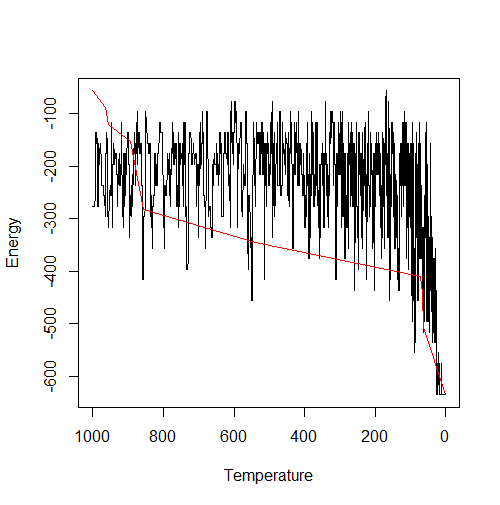
Tasked with optimising a complicated system, I went down the route of heuristic optimisation and ended up creating a simulated annealing algorithm in R.

I don't want to go into too much detail about how the model works, because that has been done well enough elsewhere, but essentially it is a smart way of searching through all the possible solutions to a problem to find the best one, while avoiding getting stuck in local minima. Taking inspiration from nature, it's based on the physical cooling of metals from a high temperature; when this is done very fast (e.g. by dropping the metal into water), the metal forms small grains (crystals), and still has a lot of energy trapped in the crystal structure. If this is done very slowly however, large grains form (more of molecules are aligned), and so the metal reaches a much lower (more optimal) energy state.

While it isn't guaranteed to find the absolute optimum solution, it will get you to a good solution fast, which is often what you really want.

undefined

Click permalink below to see the code!

Global Address Book Visualisation (Part II)

The natural way to visualise this data is as a tree diagram. Here I've extended the d3 tree by Rob Schmuecker to work with our csv data. You can expand and collapse the nodes, zoom in and out, and drag the canvas to pan around. Obviously, I've swapped real data for something more blog friendly...

For our use case, because we had a lot of nodes, we wanted to be able to search the org chart, displaying sub-trees depending on the result. We also needed to overlay information like location, role, grade and contact details in popups. For the full caboodle, also incorporating filters in angular.js, take a look at ubero's post, or go straight to his worked example!

Newer posts → Home ← Older posts